Are you new to SEO? You may already have heard about the importance of SEO.
Want to know what is SEO and other search engine optimization basics? You’re in the right place.
Before you start hiring others or investing money in SEO related stuff, it’s always a brilliant idea to know the basics first. That way, you’ll not only understand how it works, but you’ll spend your time and money on the RIGHT aspects of SEO.
Here’s what you’ll learn in this guide:
- How is SEO different from SEM and PPC?
- Why do you need SEO
- Different types of SEO
- Important SEO Metrics and more
Are you ready? Let’s get into the details.
Table of Contents
What Is SEO?
SEO stands for Search Engine Optimization.
Search engine optimization is the process of optimizing your website and its content to rank higher in search engine results for a specific keyword phrase.

SEO is the process of improving a website’s rankings in the organic (unpaid) listings of search engines such as Google, Bing, Yahoo, etc. Proper SEO will enhance your website’s organic visibility in search results, helping you attract qualified visitors (for free).
Why is SEO important in 2026?
Why should you consider doing SEO? Is it really worth it? Let’s find out.
Did you know that the #1 organic result gets 10x more clicks than a page ranking in position #10?

Here’s another interesting thing: the top THREE organic search results get more than 50% of all the clicks.
This is the reason why your business needs SEO.
Imagine ranking in the top three search results for competitive and relevant keywords in your industry. You’ll generate HUGE amounts of traffic and sales for FREE.
You need SEO to rank your web pages in the top search results. Simply put, if you’re ignoring SEO, you’re leaving all the traffic, leads, and profits to your competitors who are already doing it.
Here’s a quick overview of the benefits of using SEO for your business;
- More traffic: By optimizing your website for relevant keywords, you can attract more organic traffic. Also, you don’t have to pay anything for that traffic, as SEO traffic is 100% FREE.
- Better conversions: Our blog gets better conversions because we MOSTLY rely on SEO for traffic. SEO helps you improve your website’s user experience and attracts HIGHLY targeted visitors from Google, ultimately leading to higher conversion rates.
- Brand awareness: What happens when you rank for many keywords related to your business? People will recognize your brand. When people see your website ranking high in Google searches, they’re more likely to remember your brand and trust you.
- More sales: The reason businesses spend a lot on SEO-related things such as website design, content marketing, etc., is because it helps you highly qualified leads who are already interested in what you have to offer. It ultimately helps you with more website sales.
- BEST long-term ROI: Whatever we’ve spent on SEO in the last 13 years, we’ve generated 3 to 5 times more revenue. SEO is a long-term game offering excellent ROI in the long run. With time, your website’s organic traffic and sales will only go up.
Want more details? You can check out these amazing benefits of SEO in 2026.
How does SEO work?
SEO is constantly changing. What had worked a decade ago won’t work today, and what’s working today may not work after a year.
So let’s get a broader perspective on what is going on in SEO today. There are generally three components search engines like Google use to rank a web page in search results, which are;
- Crawling
- Indexing
- Serving

Let’s briefly discuss each one so you can better understand those steps.
1. Crawling: Search engines like Google use bots (which are also known as spiders or crawlers) that crawl websites and all the web pages on the web.
2. Indexing: In this step, after crawling, Google bots analyse the page content and store that content in their index (which is a massive database from where the content can later be retrieved).
Quick Note: If you have updated a blog post or page on your website and indexing hasn’t been completed, Google will show the old version of that page in the search results.
3. Serving: After Crawling and Indexing is done, Google will serve the results to the users (which is retrieved from its database, which contains trillions of web pages and data).
How is SEO different from SEM and PPC?
In search engine optimization, you’ll often hear two everyday things: SEM and PPC.
First things first, SEM and PPC are NOT the same. Here’s a quick overview of both;
- SEM (Search Engine Marketing, which includes both paid and unpaid methods)
- PPC (Pay-Per-Click, which provides for ONLY paid ads in search engines)
So, how are SEM or PPC different from SEO? Let’s find out.
SEM vs SEO
SEM stands for Search Engine Marketing. It involves using all the activities to improve your search rankings for your target keywords. SEM can be both paid and unpaid.
SEM is your best bet if you’re looking for a FASTER way to get your website in front of people who are already searching for what you have to offer.
For example, when you search for “best email marketing software” on Google, you will find a few paid ads at the top of the page.

Similarly, the advertisers who are paying for these ads also write blog posts about email marketing software (to generate free traffic).
For the same example, Brevo also ranks in organic search for the same keyword.
Have a look;

What can you learn from the above example? Brevo is using SEM, as it is using paid ads, and also ranking for its target keyword on the first page.
SEM Pros:
- SEM is a good option if you want to see results quickly. You can start getting traffic to your website once your ads are approved.
- You can use both SEO and SEM channels together. For example, you could use SEM to get traffic to your website while you are working on improving your SEO. Once your SEO starts to improve, you can reduce your investment in SEM.
- The ability to monitor the performance of your paid ads and make adjustments as needed.
- SEM offers long-term benefits, as you’ll also be putting SEO efforts that can lead to long-term SEO benefits, such as improving your website’s ranking, credibility, and authority
SEM Cons:
- SEM can be expensive, especially when bidding on competitive and HIGH CPC keywords.
PPC vs SEO
PPC stands for Pay-Per-Click. It is a type of PAID search marketing where advertisers pay a fee each time a user clicks on their ad. PPC is the most common type of SEM but not the only type.
Let’s take the same example keyword, “best email marketing software.”
Here’s what PPC ads look like;

As you can see above, businesses HAVE to pay Google to have their ads appear in these TOP spots because they know that people searching for this keyword will likely be interested in buying email marketing software.
In conclusion, SEM is a broader term that includes all paid and unpaid search marketing activities, while PPC is a part of SEM that involves ONLY paid ads.
Whereas SEO involves ONLY FREE organic traffic where you’ll have to rank for the keywords.
PPC Pros:
- You’ll get quick results and you can set ANY budget you want depending on the keywords you want to target.
- You can set daily or monthly on ad spend depending on the PPC ad performance
- PPC gives access to HIGHLY targeting options, such as demographics, interests, keywords, and location. This means you can reach a highly specific audience.
- With PPC ads, you can find out what’s exactly working, as you’ll get detailed analytics and conversion tracking
- More flexibility as you can change ad creatives or pause campaigns whenever you want
- It can help you increase the overall organic visibility of your brand and create awareness, even if users don’t click on your ads.
PPC Cons:
- It can be expensive, as it only involves paid clicks. This means you’ll have to pay for every single click coming from search engines like Google.
Different types of SEO
SEO is an ocean. There are many ways to optimize your website to grow its search rankings.
Here are some types of SEO you can learn and implement to improve your rankings.
On-page SEO: It involves optimizing the elements of your website that are under your control, such as your website’s content, title tags, meta descriptions, images, page speed, user experience, etc. The key to on-page optimization is to write high-quality content that is relevant to your target audience.
Off-page SEO: Optimizing the elements of your website that are outside of your control, such as backlinks, social signals like Facebook shares, tweets, etc. Try to build high-quality backlinks from other websites and promote your content on social media.
Technical SEO: Optimizing the technical aspects of your website, such as the site structure, website crawling, mobile-friendliness, improving core web vitals score, etc. It is all about creating an easy-to-use website structure, optimizing your page load times, and creating a mobile-friendly design for your website.
Local SEO: The practice of optimizing a website for local search results. It involves creating a Google My Business profile, optimizing your website for local keywords, and getting reviews from local customers.
eCommerce SEO: It is the process of optimizing eCommerce websites for search results. This includes optimizing the product pages, category pages, and checkout process.
Apart from the above SEO types, there are many other SPECIFIC specializations as well, such as enterprise SEO, app SEO, video SEO, and more.
So, which type of SEO should you use? It ultimately depends on your website traffic goals, your industry, and the keywords you target.
Must Read: 11 Types of SEO: What They Are & How to Use Them Like A Pro
How to Get Started With SEO in 2026
The best way to learn SEO is by doing. Here’s how you can get started.
Step 1: Do Keyword Research Before Writing
Before publishing anything, know what people are searching for.
Keyword research means finding the exact words people type into Google.
If you’re a beginner, focus on long-tail keywords (4+ words).
They are:
- Easier to rank for
- Less competitive
- More targeted
- Better for conversions
Example:
- “SEO” (too broad)
- “SEO checklist for beginners 2026”
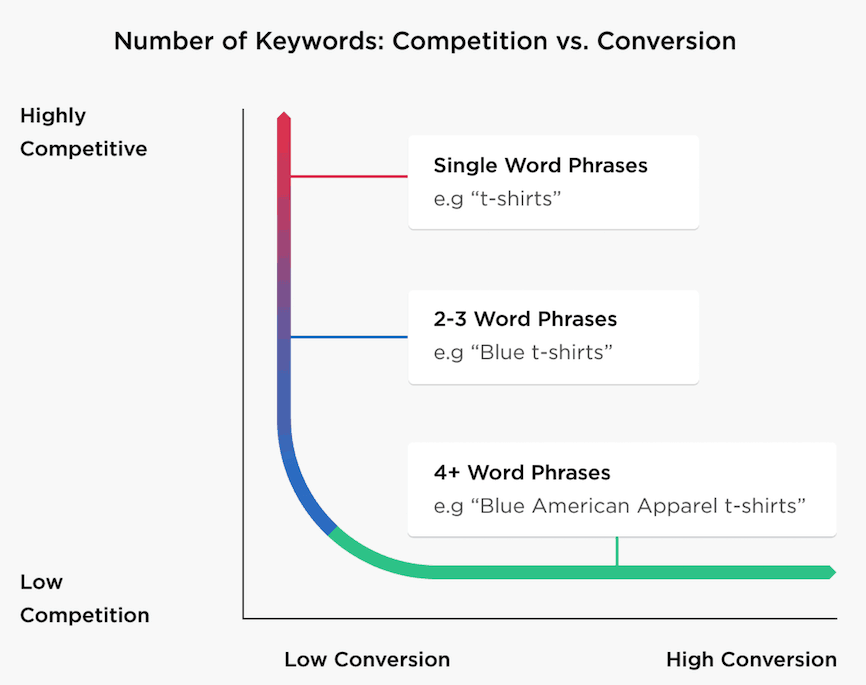
As you can see above, 4+ word phrases (which are long tail keywords) have low competition but they produce higher conversions.
Step 2: Create Extremely Useful Content
You won’t rank in 2026 without HELPFUL content. Period.
Good content solves a real problem. It answers questions clearly, keeps people reading, and helps them take action.
Google now rewards content that is:
- Helpful
- Well-researched
- Easy to understand
- Written for humans (not bots)
Long tail keywords have less competition and higher conversion rates when compared to short tail keywords.
Step 3: Optimize Your Content
Once content is ready, optimize it properly:
- Use your main keyword in the title and URL
- Add it naturally in headings
- Write a clickworthy meta description
- Improve the overall readability
Tools for on-page SEO: If you’re using WordPress, there are a ton of tools that can help you with on-page optimization, but the following two plugins are highly recommended.
- Rank Math SEO: Rank Math lets you optimize your posts for unlimited focus keywords. Features include keyword placement suggestions, on-page SEO checks, schema markup, and built-in analytics.
- WordPress SEO by Yoast: Yoast SEO is one of the most popular SEO plugins, with millions of downloads worldwide. Features include on-page SEO optimization, XML sitemaps, readability analysis, and breadcrumb support.
Step 4: Use Clear Navigation to Help Users and Search Engines
In 2026, your website’s navigation affects both user experience and SEO.
Simple rule: Any important page on your site should be reachable within 3 clicks.
That includes:
- Contact page
- Key articles
- Product or service pages
- Email signup
If it takes more than 3 clicks, fix the structure.
Here are some useful tips to make your website navigation structure simple to both your website users and search engine crawlers.
Use a navigation menu: If you look at our blog’s home page, you’ll notice a navigation menu. Have a look;

Almost every single page and a blog post can be discovered from that navigation menu.
From our premium products such as eBooks to various categories to popular posts, about and contact page information – everything can be found on our navigation menu.
Most website templates and themes allow you to show a navigation menu on your site, so make sure to use it for easier access to your website users.
Use your footer wisely: Your footer is as important as header navigation on your site. You can also keep your footer section simple by just listing the social media profiles to follow, your most important posts etc. As your blog grows, you can make more changes and include more links like we did for better search crawlability.
Implement a SILO structure: Silo site structure helps you organize your website’s content into various categories and subcategories. A Silo structure helps Google search crawlers to easily determine the relevance of each post on your blog based on your keywords.
Here’s an illustration of a deep silo structure.

So how can you implement it? Simply divide your blog’s main topic into several categories so you can create specific blog posts for each category.
You can read more about implementing silo structure for better SEO where you can find an easy tutorial to implement it.
Step 5: Build Highly Relevant Backlinks
According to a survey done by Moz, more than 37% of business owners are spending between $10,000 and $50,000 per month on external link building.
Hands down, link building is the #1 ranking factor in Google. If you want higher rankings for your keywords, you need more links. It’s as simple as that.
Most people think link building is hard. That’s why they never spend time on building links. It’s not rocket science either. That being said, here are the top 3 evergreen ways to build high quality and relevant backlinks in any niche.
1. Write guest posts for others: Guest posting is the evergreen strategy to build highly relevant links. But you need a proper guest posting strategy to get started with link building as you can’t simply spam others email inboxes with your guest post pitches.
Make sure to find the right blogs in your industry to get started with your guest blogging journey. So how can find the relevant guest posting sites in your niche? You can use the following Google search strings to find relevant blogs and websites in your niche to write guest posts.
- [your topic] “write for us”
- [your topic] “become an author”
- [your topic] “guest post”
- [your topic] “guest article”
Alternatively, check out this post where you can find over 350+ guest blogging sites across so many niches.
2. Steal your competitors’ backlinks: Your competitors are your biggest sources for link building. If used right, you can spy on your competitors sites to start building cleverly.
So how can you steal your competitors’ backlinks? You can use competitor research tools like Semrush.
Once you’re on Semrush, go to Backlink Analytics under the Link Building tool and enter any domain (such as your competitors’ domain).

As you can see above, the Semrush link-building tool provides an instant overview of the backlink profiles of your competitors’ domains.
Once you click on their Backlinks section, it will show you a list of all the sources of their backlinks.
Here’s what it looks like;

See that? Once you know the backlink sources of any domain, you can use various link-building strategies like blogger outreach, broken link building, guest posting, etc, to acquire those links to your site.
3. Build relationships: Most people underestimate the power of relationship building. If done right, building strong relationships with other bloggers can go a long way. The key here is to network with everyone, including;
- Influencers in your industry
- A list of bloggers
- New bloggers
- Micro-influential bloggers
Make sure to come up with a list of 20 to 30 (or even more) sites in your industry and start doing the following things to build relationships.
- Frequently send emails (to praise their work or suggest something useful to their audience)
- Buy their products (and give a shout-out on social media)
- Subscribe to their email lists
- Leave thoughtful comments on their blogs
- Write guest posts for them
Do everything you can to build strong relationships with other bloggers (including linking to their blog posts). Sooner or later, they’ll also reciprocate the same thing – not everyone, though, but at least a few bloggers will do the same thing for you.
FAQs on SEO Definition
Here are the answers to some common questions about SEO.
Can I do SEO myself?
Yes, you can do SEO yourself. But, you need to understand how search engines like Google rank websites. They consider things like helpful content, user experience, backlinks, and website trustworthiness. If you focus on improving those things, SEO can become easier.
How do I learn SEO?
The best way to learn SEO is to start your own website and learn the basics of SEO, such as keyword research, on-page SEO, and off-page SEO. Apply those things to your website. You’ll learn A LOT that way. Also, you can read some SEO books to learn and master search engine optimization.
Do I need an SEO tool?
You can use SEO tools to supplement your own SEO efforts. But don’t expect them to do all the work for you. Focus on creating great content and building backlinks first. You can give a try with Semrush Free SEO tool.
What is mobile SEO?
Mobile SEO involves optimizing websites for mobile devices and tablets. It also involves making your web pages load quickly and have responsive designs for mobile users.
What are some common SEO techniques?
Some common SEO techniques include:
– Keyword research (involves finding the relevant keywords that your target audience is searching for)
– On-page SEO (optimizing your website’s content for your target keywords)
– Off-page SEO (building backlinks to your website from other high-quality websites)
Final thoughts on SEO basics
By learning proper SEO, you can increase your search visibility. By increasing your search visibility, you can bring more visitors, which ultimately leads to more conversions and sales.
So make sure to learn and implement SEO basics to boost your organic rankings.
Hope you understand what SEO means and all the SEO basics you need to implement for better results in search engines. If you’ve any more questions about SEO basics, let us know in the comments.

About Author
Anil Agarwal is the Founder of Bloggerspassion. He is a full-time blogger and SEO expert who has been helping people build profitable blogs for over a decade Now. He has been featured in Over 100 Publications including Forbes, The HuffPost, HubSpot, Shopify, Semrush, Kinsta, Bluehost, Hostinger and G2.com etc. Know more about Anil Agarwal from here.
Connect him on:


Leave a Reply